

VARTA

Matrix VARTA

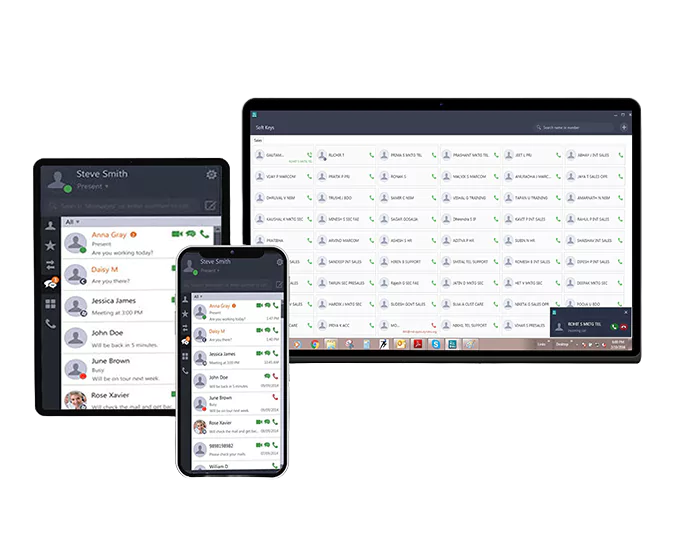
Introducing Matrix VARTA WIN200 - The UC Client, redefining communication
experience with its variety of collaboration features and intuitive user interface.

Supported Operating Systems
  • Windows Operating System: VARTA WIN200
  • Android Operating System: VARTA ADR100
  • Apple Operating System: VARTA AMP100
  • The UC Client offers One Touch Access to Extension Numbers
  • Instant Messaging (IM) and Presence Status
  • Audio and Video Conferencing
  • Monitor Real-time Status of Employees
  • File Sharing and Collaboration Tools
  • Through UC Client Desktop/Laptop Extension Enables to Work Remotely
  • Team Messaging and Group Chat
  • Multi-party Audio Conferencing
  • Document Sharing and Version Control
  • Task Management and Assignment

Highlight Features

image

1000 DSS and 600 BLF Keys

Through UC Client, allow quick access to extensive call functions, contacts, and status indicators for enhanced productivity

01

Corporate Directory Integration

Seamless integration with the organization's directory for easy search and dialing of contacts

02

Presence Sharing

Through UC Client view the availability status of colleagues and facilitate effective coordination

03

image

Call Management

Offers robust capabilities, including call transfer, call hold, call recording, and more, for seamless communication control

04

image

Drag and Drop Conference

Intuitively add participants by simply dragging and dropping contacts into the conference window through the modern UC Client

05

image

Contact Grouping

Categorize and organize contacts into custom groups for easy access and streamlined communication

06

image

Search Dial Pad

Quickly find and call contacts by typing their name or number directly on the dial pad

07

Intuitive Icons

The UC Client offers visually recognizable symbols for various functions and actions, ensuring effortless usage and quick access to features

08

image

Outlook Integration

Enables easy access to contacts, calendar integration, and streamlined communication directly from your email client


09

VARTA

VARTA Variants.

The UC Client for Seamless Collaboration

  • Register Android/iOS/Windows Desktop UC Clients
  • Three-party Audio Conference
  • Instant Messaging
  • Corporate Directory
VARTA ESSENTIAL

Technical Specifications

FeaturesVARTA ESSENTIAL
WIN200ADR100AMP100
Making, Receiving Audio & Video CallsYYY
Hold, Transfer, Blind & One-touch Transfer,
Intercom, DND, 3-Party Audio Conference, Call Forward Voicemail
YYY
Presence, IM & SMS, Global Directory Access,Favorites All Menu and call featuresYYY
Handover---
HotkeysY--
Drag & Drop – Transfer & Conference---
Contact Grouping & DSS Softkeys---
DSS Softkeys for Mobile Users---
BLF Subscription---
Blind Transfer to VMS & Click to Call---
Outlook & Calendar Integration & Presence Contact Card Integration---
Multi-Party Conference---
Screen sharing and Application sharing---
  • Register Android/iOS/Windows Desktop UC Clients
  • Multi-party Audio Conference
  • 1000 DSS Keys
  • 600 BLF Keys
VARTA PROFESSIONAL

Technical Specifications

FeaturesVARTA ESSENTIAL
WIN200ADR100AMP100
Making, Receiving Audio & Video CallsYYY
Hold, Transfer, Blind & One-touch Transfer,
Intercom, DND, 3-Party Audio Conference, Call Forward Voicemail
YYY
Presence, IM & SMS, Global Directory Access,Favorites All Menu and call featuresYYY
HandoverYYY
HotkeysY--
Drag & Drop – Transfer & ConferenceY--
Contact Grouping & DSS SoftkeysY--
DSS Softkeys for Mobile Users-YY
BLF SubscriptionYYY
Blind Transfer to VMS & Click to CallY--
Outlook & Calendar Integration & Presence Contact Card Integration---
Multi-Party ConferenceYYY
Screen sharing and Application sharing---
  • Register Android/iOS/Windows Desktop UC Clients
  • Screen Sharing
  • Outlook Call and Calendar Integration
  • IM through Outlook
VARTA COLLABORATION

Technical Specifications

FeaturesVARTA ESSENTIAL
WIN200ADR100AMP100
Making, Receiving Audio & Video CallsYYY
Hold, Transfer, Blind & One-touch Transfer,
Intercom, DND, 3-Party Audio Conference, Call Forward Voicemail
YYY
Presence, IM & SMS, Global Directory Access,Favorites All Menu and call featuresYYY
HandoverYYY
HotkeysY--
Drag & Drop – Transfer & ConferenceY--
Contact Grouping & DSS SoftkeysY--
DSS Softkeys for Mobile Users-YY
BLF SubscriptionYYY
Blind Transfer to VMS & Click to CallY--
Outlook & Calendar Integration & Presence Contact Card IntegrationY--
Multi-Party ConferenceYYY
Screen sharing and Application sharingY--